All projects

CASE STUDY

TheMove Pro

Nightlife event management, for promoters and door staff

An event app for the two people who run a night: the promoter selling it and the staff on the door.

Role
Product design, end to end
Disciplines
Proto-personas, flows, interface design, prototype
Surfaces
Two roles in one app, the promoter and the door

THE PROBLEM

Where this started

TheMove Pro is a nightlife management app for Lagos, for the people running the night rather than the guests: creating the event, managing table reservations and the guestlist, and checking people in at the door.

  • 01Publishing an event takes too long on the tools promoters use now, and most of them work from a phone.
  • 02Tickets, table reservations and the guestlist sit in different places, so nobody has the whole night in one view.
  • 03At the door it is dark, the queue is moving, and the only tool is a phone. A slow scan or a frozen app stops the whole line.

THE DECISIONS

What I decided, and why

Each decision, why I made it, and what it cost.

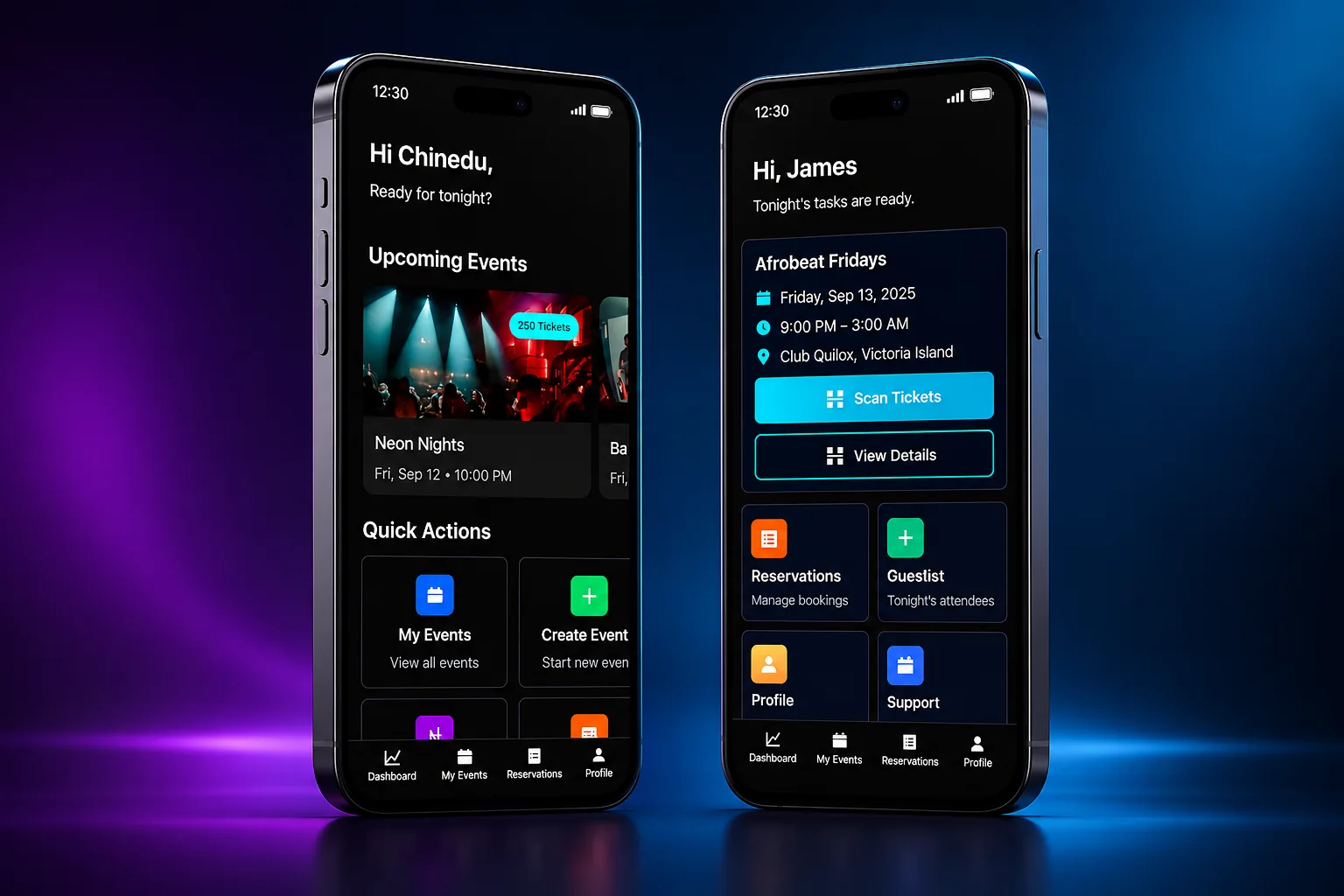
The promoter home and the staff home side by side
01

One app, two completely different jobs

Why

Promoters plan over days. Door staff need to get through the next four hours. They need different screens.

What it cost

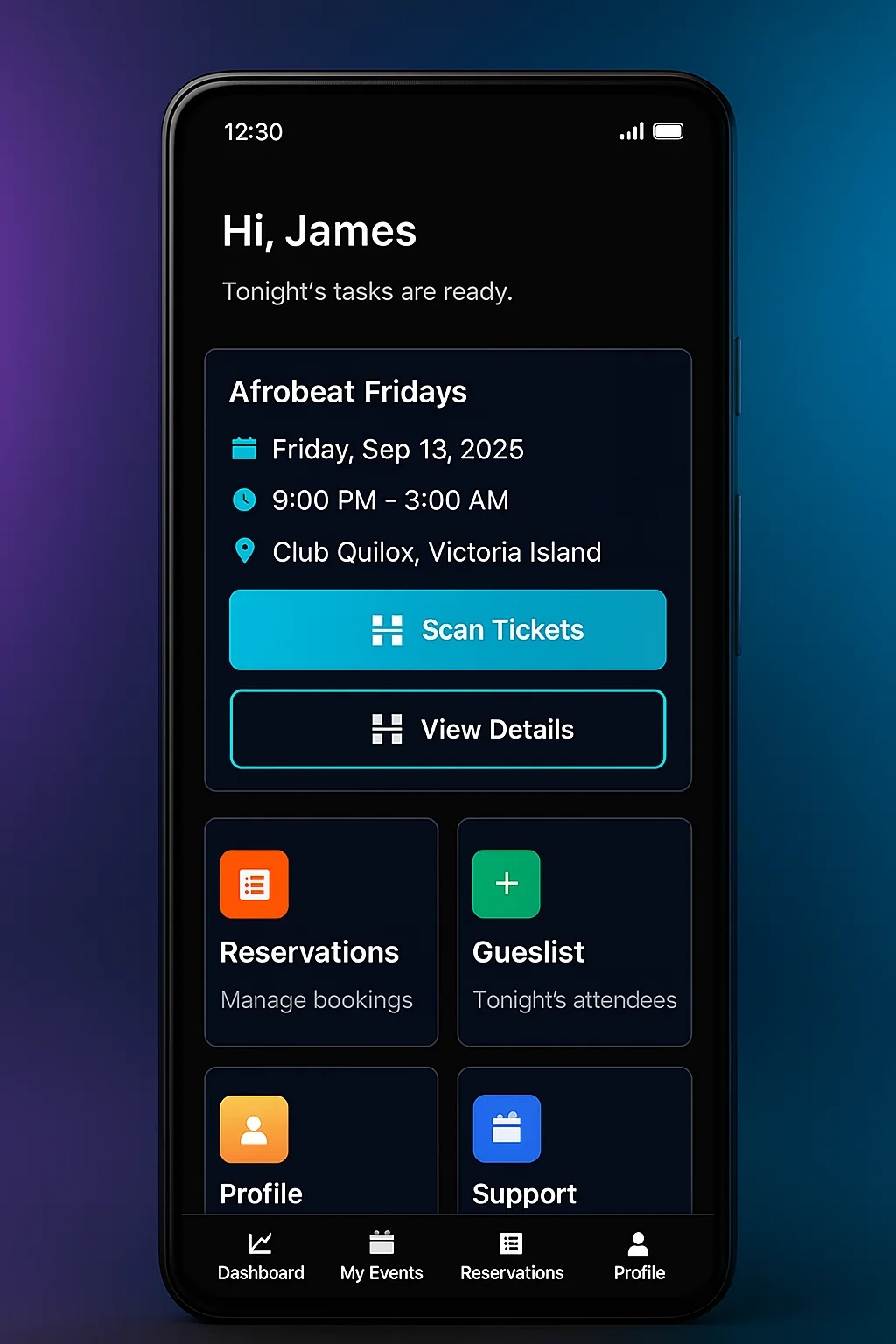
The promoter home leads with upcoming events and quick actions. The staff home opens on tonight's event, with Scan Tickets as the main button.
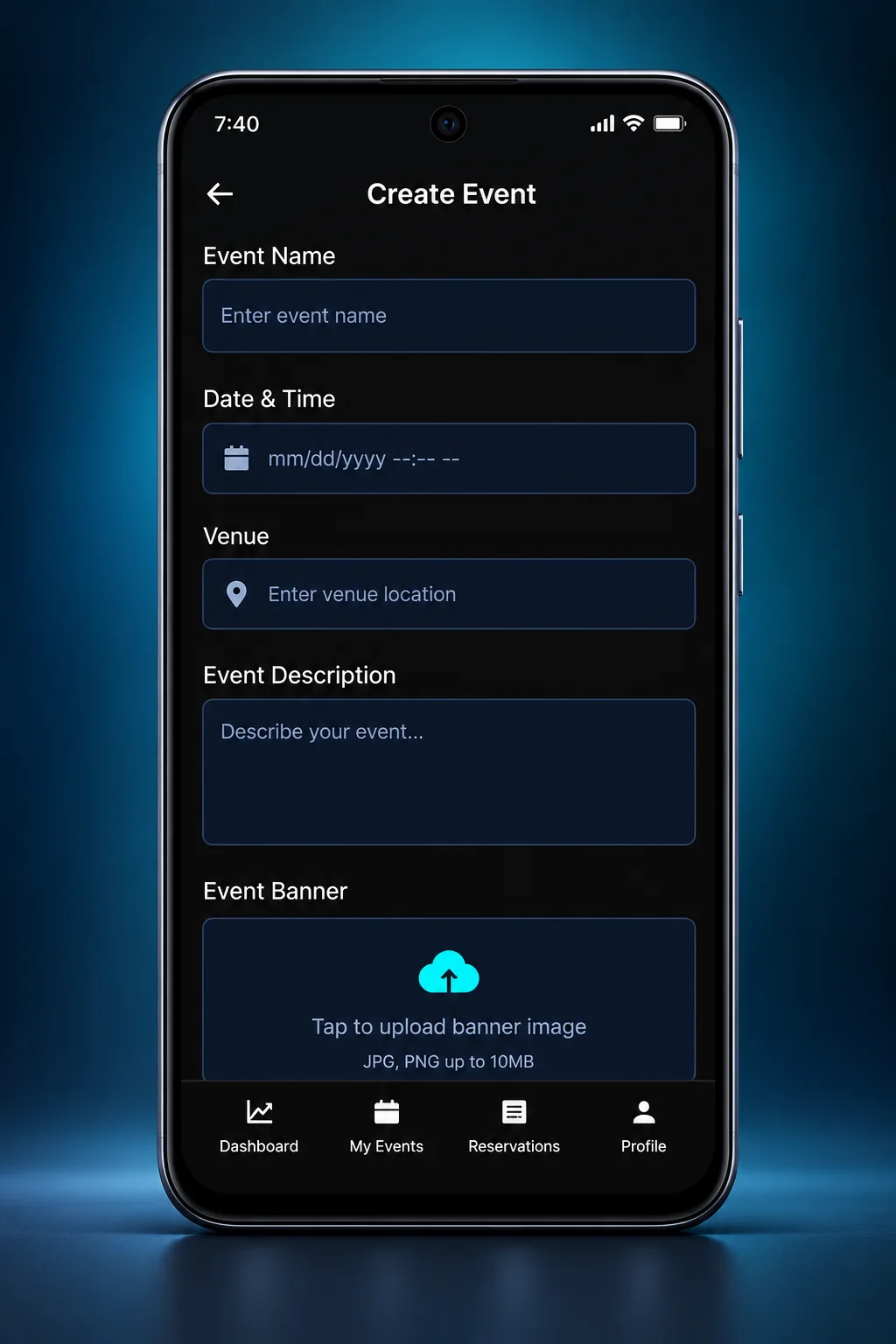
The Create Event screen
02

Creating an event is one short screen

Why

Promoters publish from a phone, often between other jobs, so creating an event has to fit in one sitting.

What it cost

Name, date and time, venue, description and a banner, on one scrolling screen. The listing starts simple, and the rest of the night is managed from reservations and the guestlist.

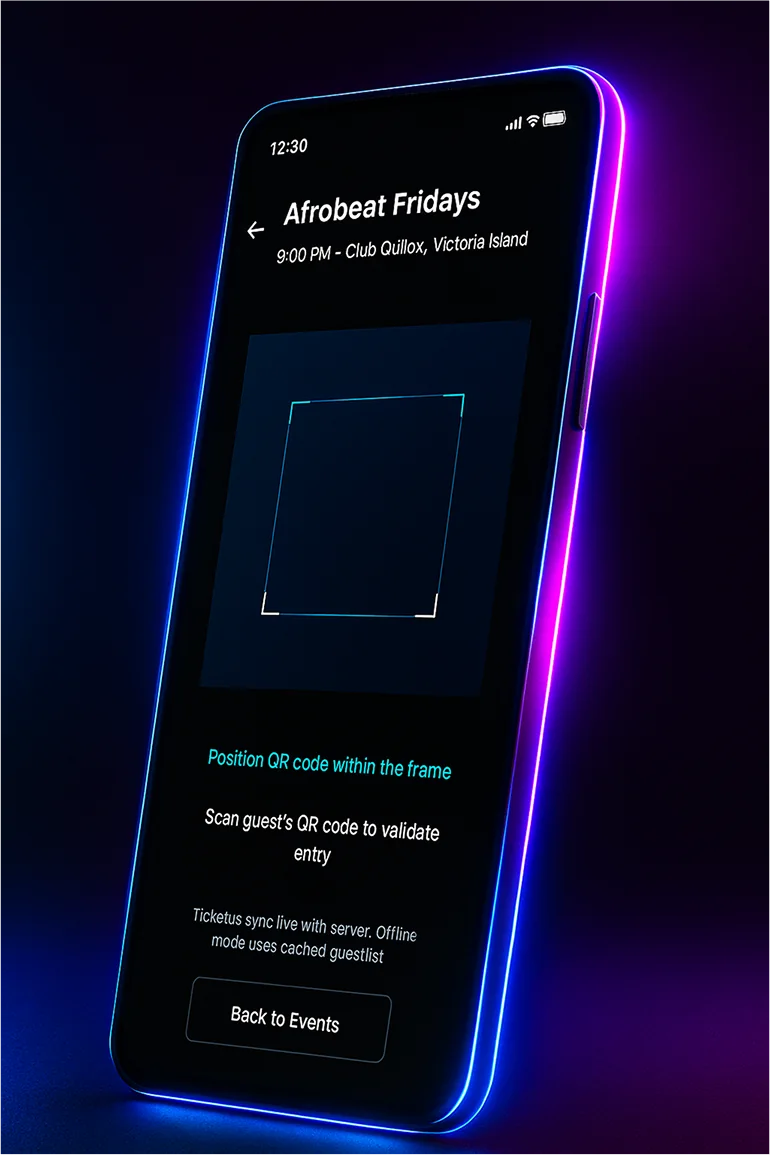
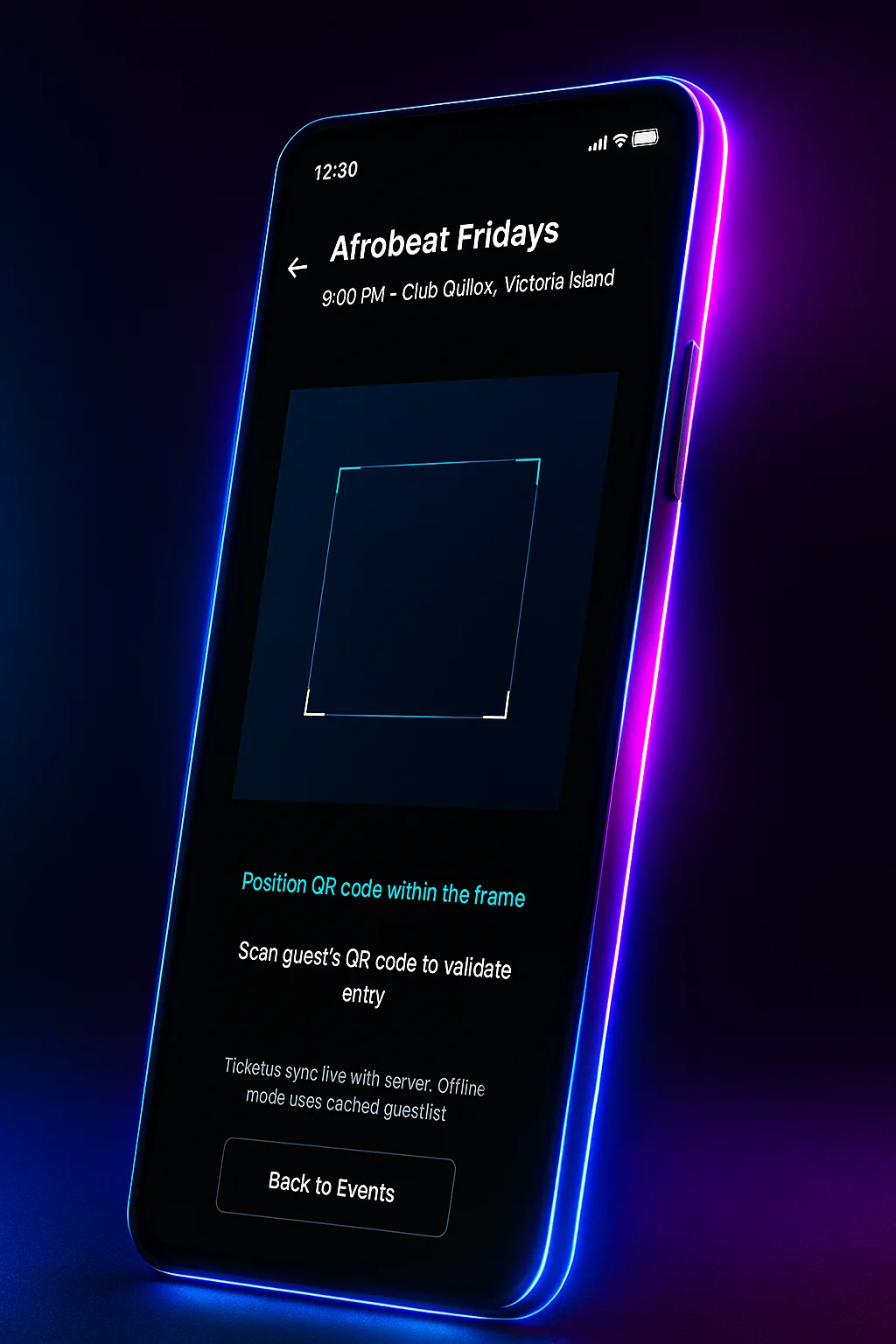
The ticket scanner for Afrobeat Fridays
03

The scanner has a fallback for weak signal

Why

Signal in a packed venue is unreliable, and the queue cannot wait for it.

What it cost

Tickets are checked live with the server. If the connection drops, the scanner falls back to a cached guestlist and syncs later, and the screen tells staff how it works.

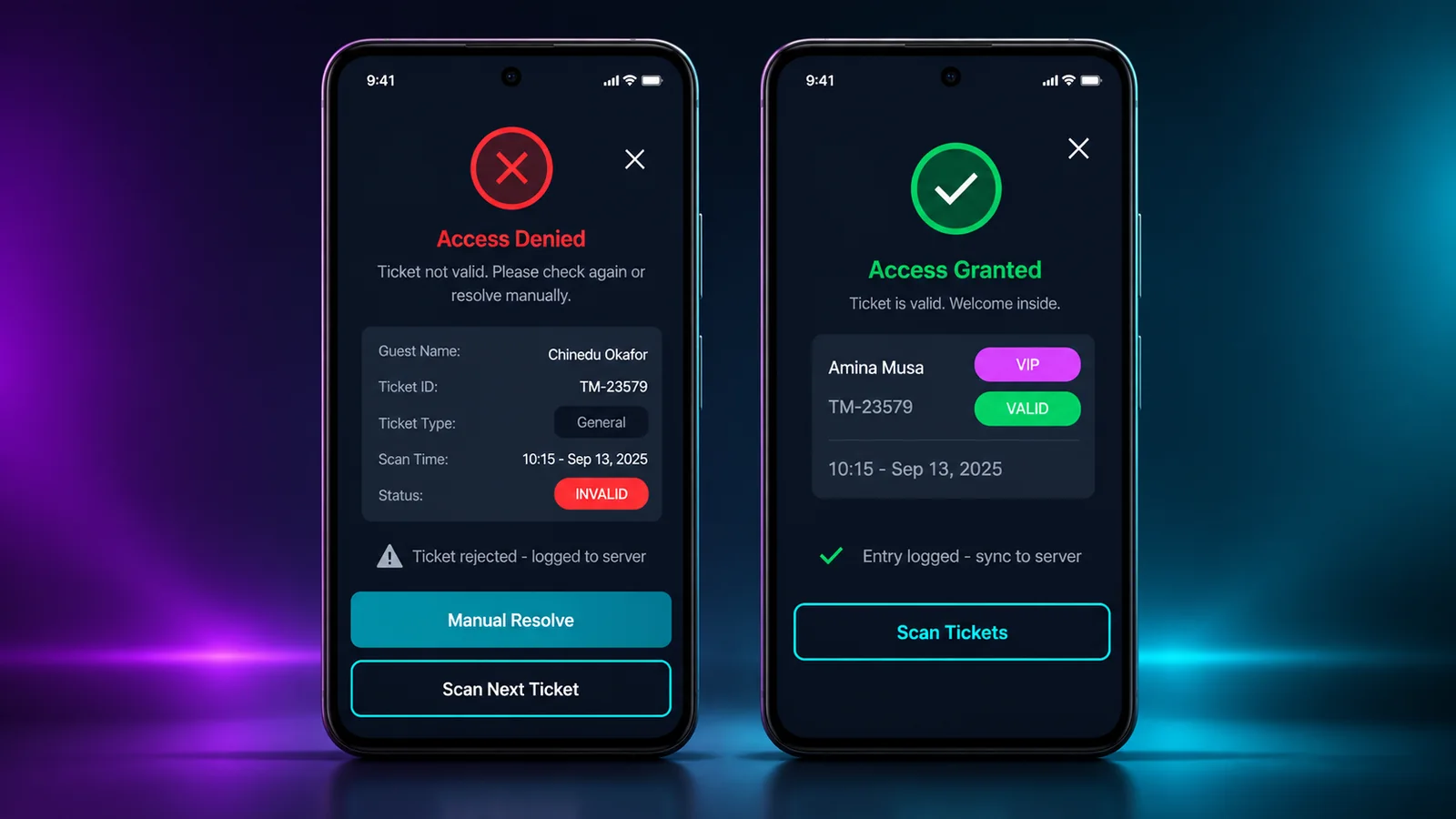
The access granted and access denied overlays
04

The answer is one word, in colour, readable at arm's length

Why

Door staff hold the phone at an angle, in the dark, with a guest in front of them. They will not read a sentence.

What it cost

Each scan ends in a full screen overlay, access granted or access denied, with a colour and an icon. A denied ticket offers Manual Verify, so staff have a next step.

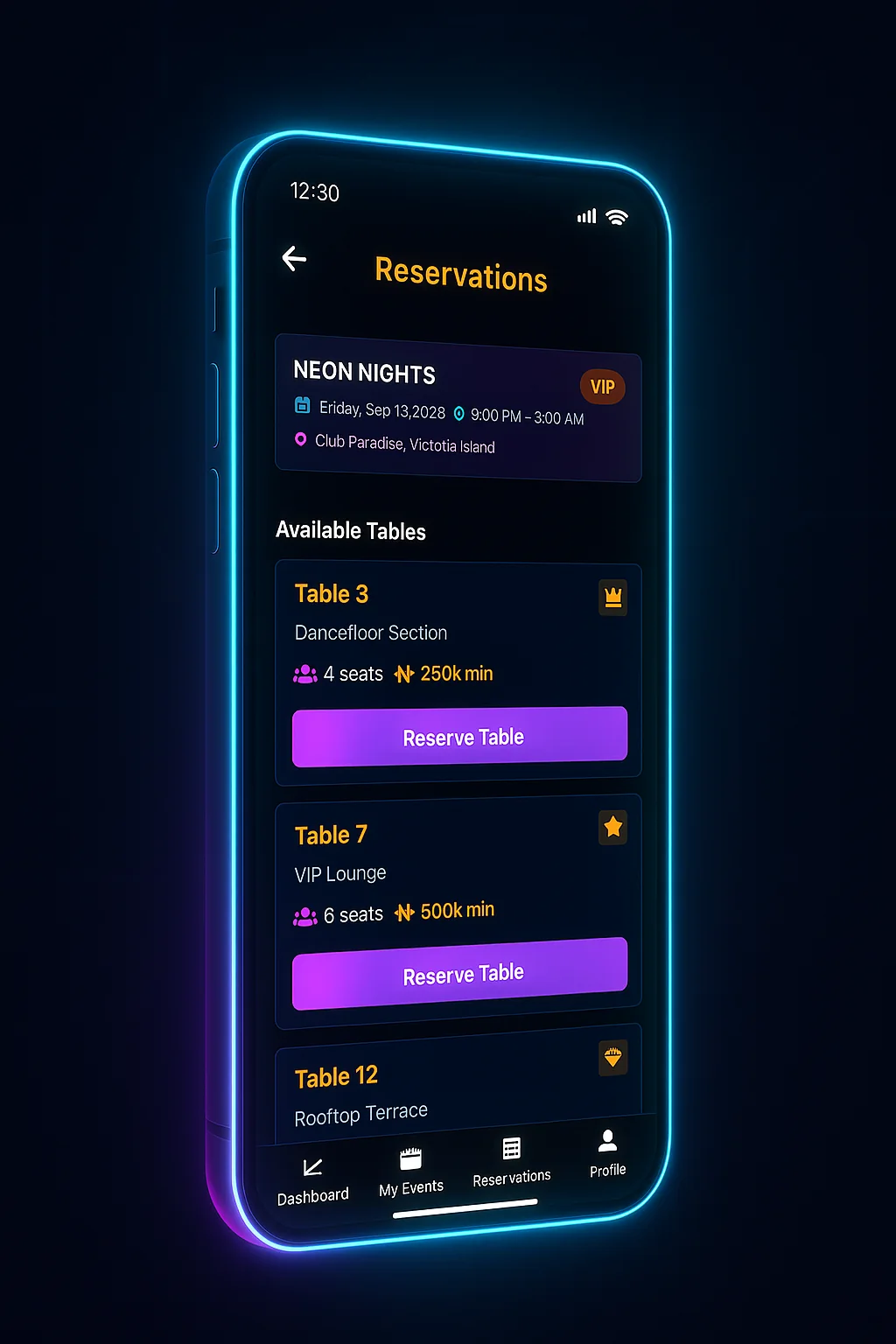
The reservations screen with available tables
05

Tables listed by seats and minimum spend

Why

A VIP table is booked on how many people it holds and what they will spend.

What it cost

Each table card shows its section, seats and minimum spend in naira, with one Reserve Table button. There is no photo of the table, so the section name does the describing.

The staff home with the cyan Scan Tickets button
06

Near black, with two neons that mean something

Why

The app is used in dark rooms, where a bright screen is uncomfortable.

What it cost

A near black background, with cyan for scanning and anything live, and magenta for booking actions like Reserve Table.

THE FLOW

Checking a guest in, with or without signal

Online and offline follow the same path.

  1. 01

    Staff open tonight's event

    The staff home opens on tonight's event, with Scan Tickets as the main button.
  2. 02

    Scan the ticket

    • Connected

      The ticket is checked live against the server.

    • No signal

      The ticket is checked against the guestlist cached on the phone, and the scan is queued.

  3. 03

    One answer, full screen

    Access granted or access denied, in one phrase and one colour, readable at arm's length in the dark. Then straight back to the scanner.

  4. 04

    Sync when the signal returns

    Queued scans upload on their own, so the promoter's numbers catch up without anyone at the door doing anything.

HOW I WOULD TEST IT

What I would test first

TheMove Pro was designed in Figma and has not been tested at a real door yet. These are the tests a first round would run, and what each result would change.

01

Can the result be read at arm's length in a dark room?

How

Run the scan flow on an Android phone at low brightness in a dim room, with the phone held at an angle, and time how long each answer takes to register.

What would change the design

If people lean in to read it, the overlay needs larger type or a shape as well as the colour.

02

Does the offline state feel normal or broken?

How

Switch the network off halfway through a queue of mock tickets and watch whether staff carry on or stop to ask what happened.

What would change the design

If they stop, the offline indicator is reading as an error and needs calmer wording.

03

Can a promoter publish a night from a phone between two other jobs?

How

Time a promoter creating an event on a phone, standing up, with one interruption.

What would change the design

If it takes more than a few minutes, the create screen needs fewer fields before publish.

THE DESIGN SYSTEM

The pieces it is built from

Near black, white text, and two accent colours with fixed meanings.

Colour

Ink black#020304App ground, everywhere
Cyan#00ffffLive state, scanning, instructions
Magenta#ff00ffBooking actions and the brand glow
White#ffffffPrimary text
White, dialled back#ffffffHelper text and small print

Typography

Everything

One sans, weight doing the hierarchy

One sans family for both roles. Bold for event names, regular for instructions, smaller muted text for secondary details.

Rules I stuck to

  • Cyan means the system is doing something right now. If nothing is live, nothing is cyan.
  • Prices always show in naira, in full.
  • Mobile first, and specifically one handed. Both proto-personas work from an Android phone standing up, not a laptop at a desk.

THE PROTOTYPE

Walk through the prototype

This one was designed, not built. The link opens the clickable prototype, so you can move through it the way either role would.

figma.com / TheMove Pro prototype
TheMove Pro, the door staff ticket scanning screen Open the prototype

HOW IT WAS DESIGNED

How it was designed

Design
FigmaClickable prototype
Research
Proto-personasPain points and motivationsRole based flows
Platform
Mobile, Android first
  • The work started with two proto-personas rather than a feature list, written as hypotheses about the people running a night. Chinedu, a promoter in Lagos who runs several nights a week, and Amaka, a hostess who checks tickets and manages VIP reservations at the door.
  • The promoter's needs were about speed and visibility before the night. The door staff's were about clarity under pressure during it. That split shaped the structure.
  • The door flow plans for a weak signal, which is how the cached guestlist fallback got into the design.

THE OUTCOME

Where it ended up

  • A prototype covering both roles end to end, from creating a night and booking tables through to checking a guest in at the door.
  • Two proto-personas written from the two sides of the same evening, as hypotheses to test rather than people I interviewed. A promoter who needs to publish and track from his phone, and a hostess who needs the queue to keep moving and would rather not be trained on anything.
  • A cached guestlist fallback for when the signal drops.
  • Designed in Figma, not built.
Download CV